Alternative purchasing mechanisms for Bolt apps
External Link Entitlement, External Content Linking and Bolt

Written by Harry Phillips
Updated at November 3rd, 2026


Table of Contents
Apple and Google Play both provide limited, region-specific ways for apps to direct customers to a publisher-owned website to purchase subscriptions or manage their accounts. These options are not universally available, and each has its own eligibility criteria, technical requirements and caveats.
On iOS, Apple provides the External Link account Entitlement (ELE) for eligible reader apps. On Android, Google Play uses separate programmes, including External Content Links for eligible apps serving users in the United States.
The sections below explain the available options and the work required to use them. The purchasing functionality available to a reader may vary depending on both their platform and region.
Differences between platforms and regions
External purchasing functionality is available for some Bolt apps, but the options differ between iOS and Android and may also vary by region.
This is mainly because Apple and Google Play have introduced different rules for users in the United States following legal action and regulatory pressure relating to their app store payment systems.
Functionality that is available in the US may not be available in other countries or regions.
iOS
External Link Entitlement (ELE)
Apple provides the External Link account Entitlement for eligible “reader” apps. Reader apps are defined as apps that provide one or more of the following digital content types as their primary functionality:
- Magazines
- Newspapers
- Books
- Audio
- Music
- Video
We expect that most Pugpig apps would fulfil this criterion, but there are additional requirements, which are detailed in Apple’s official documentation. The most notable requirement is that an app using ELE may not offer in-app purchases.
An eligible app can use ELE to link to a publisher-owned website where users can create or manage an account and purchase a subscription. The website must be owned by the developer of the app.
This allows the publisher to manage the customer relationship and subscription journey through its own systems rather than through Apple’s in-app purchase system.
US iOS purchasing
The United States has a separate external purchasing flow for iOS and iPadOS apps.
For information about how Bolt supports this flow, see US App Store-only External Link purchasing for iOS.
This US flow is separate from ELE. The available buttons, user journey and implementation requirements may differ depending on the user’s App Store region.
For eligible iOS apps outside the US, ELE remains the relevant Apple option in many regions, subject to Apple’s requirements and approval.
iOS version requirements
All new and updated Pugpig Bolt apps support the ELE flow, and can be used by readers on all supported iOS versions.
User experience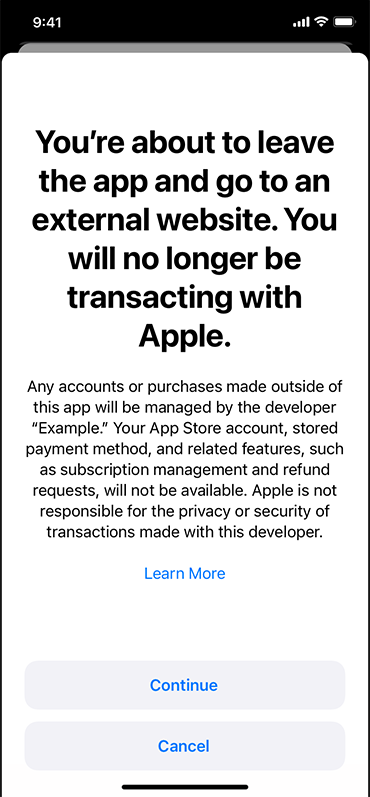
From the user’s point of view, the Bolt paywall is displayed as usual. When the user taps the subscribe button, Apple displays its own entitlement modal.
Pugpig cannot change the appearance of this modal or the copy and information displayed on it.
The modal displays the developer name rather than the app name.
When the user taps the continue button, the URL specified by the publisher opens in Safari, or the device’s default browser. The user is therefore taken out of the app to complete the account creation or subscription process.
Because the subsequent process takes place in the browser, Bolt cannot determine whether the user has successfully subscribed. Unless the user was already signed in, they will normally need to sign in when they return to the app.
This behaviour is determined by Apple’s implementation of ELE and is outside Pugpig’s control.
Applying for ELE
To use ELE, you must first apply to Apple using the External Link Entitlement request form.
Apple may ask for information including:
- The app name
- The app’s bundle ID
- The App Store listing URL
- Details about the app and its content
You can find the app name, bundle ID and store listing URL in App Store Connect.
The information requested by Apple may change over time, so use the current form and Apple’s current documentation as the source of truth.
Pugpig cannot apply for the entitlement on your behalf. The application must be submitted using your Apple Developer account. The form can only be accessed by the owner of your Apple Developer account.
Getting set up in Bolt
Once Apple has approved your app for the entitlement, raise a support ticket by emailing support@pugpig.com.
Pugpig will configure the app, test the implementation, provide a version for sign-off, and submit the update to the app store.
You would need to provide the URL that the subscribe button should open, such as the page on your website where users can create an account or purchase a subscription.
The full URL has to be be displayed in the app as a hyperlinked URL, and cannot be a redirect or short URL.
For example, https://www.pugpig.com/subscribe would be accepted, but pugp.ig/subs would not be sufficient.
Pugpig would need to regenerate the provisioning profiles for the app with the entitlement included. If you do not want Pugpig to regenerate the profiles, please let us know with your request.
Android
Google Play has separate programmes and rules for external purchasing journeys.
Temporary US policy for external purchase links
Between September 2025 and July 2026, Google Play temporarily allowed apps serving users in the US to include links to websites where users could purchase subscriptions or other digital content.
That temporary policy position has now ended.
A simple link to an external purchase journey is no longer sufficient, and apps may be flagged during Google Play review for violating the Payments policy if they direct users to make purchases outside Google Play without complying with the current programme requirements.
Any Android app using an external purchasing journey for US users must now use the appropriate Google Play programme.
More information can be found here: https://support.google.com/googleplay/android-developer/answer/15582165
US External Content Links
For users in the United States, Google Play provides a programme called External Content Links. This may allow an eligible Android app to direct users to an external destination to purchase digital content, such as a subscription.
External Content Links is not a simple external-link feature. The app, publisher, payment provider and subscription platform must meet Google’s requirements before the journey can be enabled.
The requirements may include:
- Enrolling the app in Google Play’s External Content Links programme
- Implementing Google’s External Content Links APIs
- Creating and passing Google-provided transaction tokens
- Reporting qualifying transactions to Google Play
- Providing customer support and refund processes
- Meeting Google’s security, destination and disclosure requirements
The detailed requirements and caveats are described in Google Play External Content Links for Android. That document should be treated as the source of truth for the programme.
Support for the app-side functionality does not, by itself, make an external checkout compliant or ready to use. The publisher, payment provider and subscription platform must also complete the required work.
Pugpig does not currently have any customers live on External Content Links. If you are interested, please reach out to your Customer Success Manager or Pugpig Support, as we are very keen to roll this out to Production apps.
EEA External Offers
Google Play also provides an External Offers programme for users in the European Economic Area.
Pugpig does not currently support External Offers for EEA users.
External Offers and External Content Links are separate Google Play programmes with different eligibility criteria, technical requirements, reporting obligations and commercial terms. Information about one programme should not be assumed to apply to the other.
If you are in the EEA and interested in using the External Offers functionality, please reach out to your Customer Success Manager or Pugpig Support.
Other options
If none of the options described above is appropriate, you can continue using the relevant App Store or Google Play billing system.
If you do not want to offer in-app purchases, an alternative is to tell users that they can subscribe on your website. If you use this approach, you cannot include a direct subscription link from the app.
Any wording used for this purpose should be reviewed against the applicable Apple and Google Play rules for the regions in which your app is available and is at risk of being rejected after review.
The rules and programmes described in this article may change. Always check the relevant Apple or Google Play documentation before implementing or changing an external purchasing journey.